
Day-use, assigned or bookable storage
Custom resource booking
If your workplace needs to book it, build it in askAiB.
Create bookable resource types around the way your workplace works, from lockers and equipment to collaboration spaces and specialist facilities. Give each type its own fields, rules, permissions and reporting in the same platform.
Unlimited custom resource typesCustom fields, booking rules and permissionsUse through Teams, web and mobileReport on custom resource bookings and usage
01 · CREATE ANYTHINGCreate your own bookable resource types.
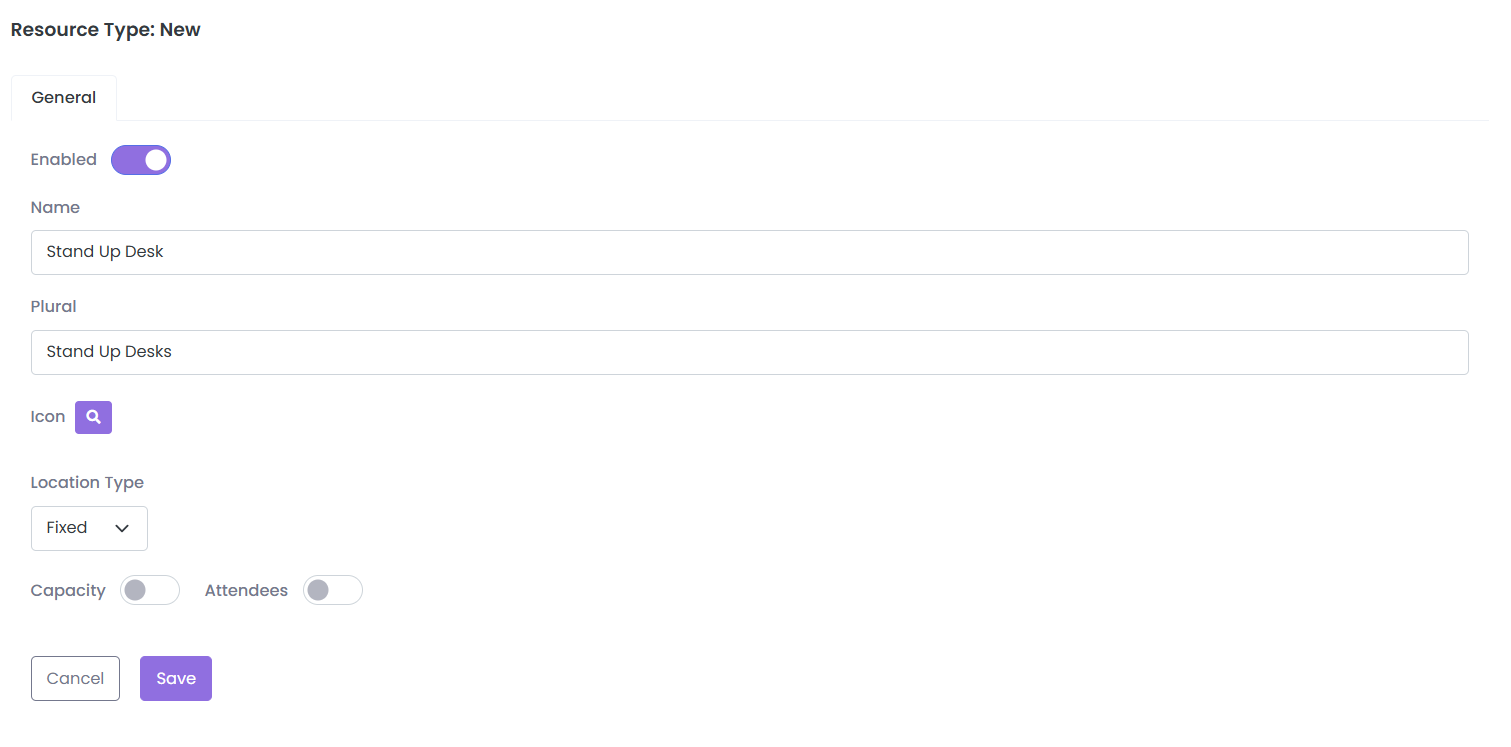
01 / 04Resource Types list and New Resource Type form · Illustrative example
Playing · Scene 1 of 4
Trusted by organisations around the world. See why they switched
Public sector procurementG-Cloud 15 framework supplier
Explore custom resources
Create the booking experience you need.Then learn from how it is actually used.
Build resource types, tailor their booking rules and fields, make them part of the wider office day and report on the activity they generate.
Beyond desks and rooms
Create the resources your workplace actually uses.
Not every space, piece of equipment or service fits a standard booking template. Create those resource types yourself, with the fields and rules they need, rather than managing them in separate tools or forcing them into the wrong category.
Shared team and project spaces
AV kits, specialist hardware and shared devices
Bookable facilities with their own availability
Longer-duration spaces for teams and programmes
Create a resource type unique to your organisation
Custom fields
Capture the detail that makes a booking actually useful.
Add the information your users need to see and the information you need them to provide. Custom fields can shape both the resource record and the booking experience, while enriching the data available for reporting.
- Text, checkbox, picklist, multiselect and numeric fields
- Add fields to resources or booking forms
- Capture organisation-specific booking information
- Use custom-field data in reporting
Example custom resource
Project Space A
Team size6-10 people
ActivityProject workshop
EquipmentScreen + whiteboard
Accessibility needsNone selected
Cost centreProduct
Your resources. Your rules.
Different resources can behave completely differently.
A project space does not need the same booking logic as a locker, equipment kit or shared table. Configure access, booking windows, approvals and availability around the value each resource is supposed to provide.
- Different permissions by user or group
- Rules that vary by day, time or booking window
- Approval workflows where required
- Concurrent-booking limits and availability controls
- Release restricted resources to wider groups when unused
Example resource rule
Collaboration Table C4
Mon-Wed · 09:00-15:00Product + Sales priority
Mon-Wed · after 15:00Available to everyone
Thu-FriAvailable to everyone
One booking experience
Custom does not mean separate.
The resources you create sit alongside desks, rooms, parking and the rest of askAiB. People can combine standard and custom resources in the same office-day booking instead of learning a different process for each one.
Microsoft 365 integration
Make custom resources feel like part of the everyday workflow.
Make custom resources available in askAiB through Microsoft Teams, web and mobile. Your people find and book them alongside desks, meeting rooms and parking without learning a different process.
- Book custom resources through Microsoft Teams
- Apply the same configured booking rules across askAiB channels
- Keep custom resources alongside desks, rooms and other bookings
Microsoft TeamsFind a resource
Search spaces, equipment and resources...
COLLABORATION SPACEProject Space A
AvailableFloor 2 · 8 people · Screen
EQUIPMENTAV Kit 04
AvailableCamera · Microphone · Tripod
STORAGELocker 47
AvailableFloor 2 · Day use
Custom resource analytics
Understand how your custom resources are being used.
Report on the custom resources you create and the custom fields attached to them. Understand demand, utilisation and the booking patterns behind the spaces, equipment and services unique to your workplace.
Explore workplace insightsWhich resources are most valued? Which are barely used? Does demand change by team, day or activity? What are people actually booking them for?
Custom resource intelligenceAiB Plaza
Illustrative example · Last 8 weeksCollaboration tables
Quiet pods
Project workshops
custom-resource demand
Utilisation by resource typeAverage booked use
Built around the workplace
“The cross resource booking functionality is incredible. It solves one of the biggest complaints our executive admins had. A real game changer.”System Administrator · Financial Services
Easy to use
“The look and feel of askAiB is a step ahead of other resource booking tools we explored. It has a modern feel and ease of use that other tools are missing.”Project Sponsor · Large Enterprise
Self-service administration
Create and maintain your own resource types.
Add a type with its own name and icon, choose its location type and decide whether capacity or attendees are relevant.
- Names and icons that fit your organisation
- Site-level resource availability
- Individual resource rules and restrictions
Inside askAiB
Why organisations switch to askAiB
Easy to adopt. Cost-effective to run.
Built around the way your workplace works.1 / 2
Custom resource FAQs
Questions buyers usually ask.
What can we create as a custom resource?
Custom resources can represent the spaces, equipment or services unique to your workplace, such as lockers, collaboration tables, equipment kits, project spaces, gym spaces or other bookable resources you define.
Is there a limit to the number of custom resource types?
askAiB supports unlimited custom resource types, allowing different offices, floors and teams to use the resource structures that make sense for them.
Can custom resources have their own booking rules?
Yes. Permissions, booking windows, availability, limits and approval logic can be configured around different resources and user groups.
What can custom fields capture?
Custom fields can include text, checkboxes, picklists, multiselect lists, numeric fields and other organisation-specific information attached to resources or bookings.
Can custom resources be booked from Microsoft Teams?
Yes. Custom resources can be made available through askAiB's Microsoft Teams booking experience as well as web and mobile.
Can we report on custom resources and fields?
Yes. Custom resources and the data captured through custom fields can be included in reporting to understand demand, usage and how those resources are performing.
Stop forcing your workplace into someone else’s booking template.
Show us the spaces, equipment and resources your people actually use and we’ll show you how to bring them into one simple booking experience.